 sgauthier
6e64e138e2
sgauthier
6e64e138e2
All checks were successful
Publish To Prod / deploy_and_publish (push) Successful in 35s
452 lines
16 KiB
Markdown
452 lines
16 KiB
Markdown
# React Waypoint
|
|
|
|
[](http://badge.fury.io/js/react-waypoint)
|
|
[](https://travis-ci.org/civiccc/react-waypoint)
|
|
|
|
A React component to execute a function whenever you scroll to an element. Works
|
|
in all containers that can scroll, including the window.
|
|
|
|
React Waypoint can be used to build features like lazy loading content, infinite
|
|
scroll, scrollspies, or docking elements to the viewport on scroll.
|
|
|
|
Inspired by [Waypoints][waypoints], except this little library grooves the
|
|
[React][react] way.
|
|
|
|
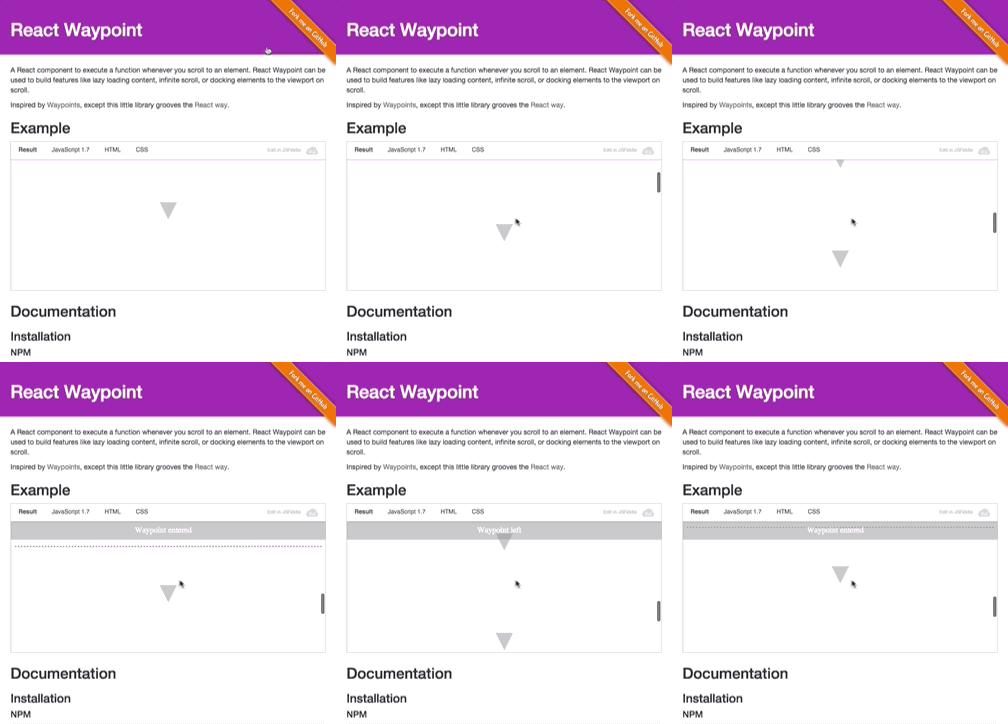
## Demo
|
|
|
|
|
|
[View demo page][demo-page]
|
|
|
|
[waypoints]: https://github.com/imakewebthings/waypoints
|
|
[react]: https://github.com/facebook/react
|
|
[demo-page]: https://civiccc.github.io/react-waypoint/
|
|
|
|
## Installation
|
|
|
|
### npm
|
|
|
|
```bash
|
|
npm install react-waypoint --save
|
|
```
|
|
|
|
### yarn
|
|
|
|
```bash
|
|
yarn add react-waypoint
|
|
```
|
|
|
|
## Usage
|
|
|
|
```jsx
|
|
import { Waypoint } from 'react-waypoint';
|
|
|
|
<Waypoint
|
|
onEnter={this._handleWaypointEnter}
|
|
onLeave={this._handleWaypointLeave}
|
|
/>
|
|
```
|
|
|
|
A waypoint normally fires `onEnter` and `onLeave` as you are scrolling, but it
|
|
can fire because of other events too:
|
|
|
|
- When the window is resized
|
|
- When it is mounted (fires `onEnter` if it's visible on the page)
|
|
- When it is updated/re-rendered by its parent
|
|
|
|
Callbacks will only fire if the new position changed from the last known
|
|
position. Sometimes it's useful to have a waypoint that fires `onEnter` every
|
|
time it is updated as long as it stays visible (e.g. for infinite scroll). You
|
|
can then use a `key` prop to control when a waypoint is reused vs. re-created.
|
|
|
|
```jsx
|
|
<Waypoint
|
|
key={cursor}
|
|
onEnter={this._loadMoreContent}
|
|
/>
|
|
```
|
|
|
|
Alternatively, you can also use an `onPositionChange` event to just get
|
|
notified when the waypoint's position (e.g. inside the viewport, above or
|
|
below) has changed.
|
|
|
|
```jsx
|
|
<Waypoint
|
|
onPositionChange={this._handlePositionChange}
|
|
/>
|
|
```
|
|
|
|
Waypoints can take a child, allowing you to track when a section of content
|
|
enters or leaves the viewport. For details, see [Children](#children), below.
|
|
|
|
```jsx
|
|
<Waypoint onEnter={this._handleEnter}>
|
|
<div>
|
|
Some content here
|
|
</div>
|
|
</Waypoint>
|
|
```
|
|
|
|
### Example: [JSFiddle Example][jsfiddle-example]
|
|
|
|
[jsfiddle-example]: http://jsfiddle.net/L4z5wcx0/7/
|
|
|
|
## Prop types
|
|
|
|
```jsx
|
|
propTypes: {
|
|
|
|
/**
|
|
* Function called when waypoint enters viewport
|
|
*/
|
|
onEnter: PropTypes.func,
|
|
|
|
/**
|
|
* Function called when waypoint leaves viewport
|
|
*/
|
|
onLeave: PropTypes.func,
|
|
|
|
/**
|
|
* Function called when waypoint position changes
|
|
*/
|
|
onPositionChange: PropTypes.func,
|
|
|
|
/**
|
|
* Whether to activate on horizontal scrolling instead of vertical
|
|
*/
|
|
horizontal: PropTypes.bool,
|
|
|
|
/**
|
|
* `topOffset` can either be a number, in which case its a distance from the
|
|
* top of the container in pixels, or a string value. Valid string values are
|
|
* of the form "20px", which is parsed as pixels, or "20%", which is parsed
|
|
* as a percentage of the height of the containing element.
|
|
* For instance, if you pass "-20%", and the containing element is 100px tall,
|
|
* then the waypoint will be triggered when it has been scrolled 20px beyond
|
|
* the top of the containing element.
|
|
*/
|
|
topOffset: PropTypes.oneOfType([
|
|
PropTypes.string,
|
|
PropTypes.number,
|
|
]),
|
|
|
|
/**
|
|
* `bottomOffset` can either be a number, in which case its a distance from the
|
|
* bottom of the container in pixels, or a string value. Valid string values are
|
|
* of the form "20px", which is parsed as pixels, or "20%", which is parsed
|
|
* as a percentage of the height of the containing element.
|
|
* For instance, if you pass "20%", and the containing element is 100px tall,
|
|
* then the waypoint will be triggered when it has been scrolled 20px beyond
|
|
* the bottom of the containing element.
|
|
*
|
|
* Similar to `topOffset`, but for the bottom of the container.
|
|
*/
|
|
bottomOffset: PropTypes.oneOfType([
|
|
PropTypes.string,
|
|
PropTypes.number,
|
|
]),
|
|
|
|
/**
|
|
* Scrollable Ancestor - A custom ancestor to determine if the
|
|
* target is visible in it. This is useful in cases where
|
|
* you do not want the immediate scrollable ancestor to be
|
|
* the container. For example, when your target is in a div
|
|
* that has overflow auto but you are detecting onEnter based
|
|
* on the window.
|
|
*
|
|
* This should typically be a reference to a DOM node, but it will also work
|
|
* to pass it the string "window" if you are using server rendering.
|
|
*/
|
|
scrollableAncestor: PropTypes.any,
|
|
|
|
/**
|
|
* fireOnRapidScroll - if the onEnter/onLeave events are to be fired
|
|
* on rapid scrolling. This has no effect on onPositionChange -- it will
|
|
* fire anyway.
|
|
*/
|
|
fireOnRapidScroll: PropTypes.bool,
|
|
|
|
/**
|
|
* Use this prop to get debug information in the console log. This slows
|
|
* things down significantly, so it should only be used during development.
|
|
*/
|
|
debug: PropTypes.bool,
|
|
},
|
|
```
|
|
|
|
All callbacks (`onEnter`/`onLeave`/`onPositionChange`) receive an object as the
|
|
only argument. That object has the following properties:
|
|
|
|
- `currentPosition` - the position that the waypoint has at the moment. One
|
|
of `Waypoint.below`, `Waypoint.above`, `Waypoint.inside`,
|
|
and `Waypoint.invisible`.
|
|
- `previousPosition` - the position that the waypoint had before. Also one
|
|
of `Waypoint.below`, `Waypoint.above`, `Waypoint.inside`,
|
|
and `Waypoint.invisible`.
|
|
|
|
In most cases, the above two properties should be enough. In some cases
|
|
though, you might find these additional properties useful:
|
|
|
|
- `event` - the native [scroll
|
|
event](https://developer.mozilla.org/en-US/docs/Web/Events/scroll) that
|
|
triggered the callback. May be missing if the callback wasn't triggered
|
|
as the result of a scroll.
|
|
- `waypointTop` - the waypoint's distance to the top of the viewport.
|
|
- `viewportTop` - the distance from the scrollable ancestor to the
|
|
viewport top.
|
|
- `viewportBottom` - the distance from the bottom of the scrollable
|
|
ancestor to the viewport top.
|
|
|
|
If you use [es6 object
|
|
destructuring](https://developer.mozilla.org/en/docs/Web/JavaScript/Reference/Operators/Destructuring_assignment),
|
|
this means that you can use waypoints in the following way:
|
|
|
|
```jsx
|
|
<Waypoint onEnter={({ previousPosition, currentPosition, event }) => {
|
|
// do something useful!
|
|
}}
|
|
/>
|
|
```
|
|
|
|
If you are more familiar with plain old js functions, you'll do something like
|
|
this:
|
|
|
|
```jsx
|
|
<Waypoint onEnter={function(props) {
|
|
// here you can use `props.currentPosition`, `props.previousPosition`, and
|
|
// `props.event`
|
|
}}
|
|
/>
|
|
```
|
|
|
|
## Offsets and Boundaries
|
|
|
|
Two of the Waypoint props are `topOffset` and `bottomOffset`. To appreciate
|
|
what these can do for you, it will help to have an understanding of the
|
|
"boundaries" used by this library. The boundaries of React Waypoint are the top
|
|
and bottom of the element containing your scrollable content ([although this element
|
|
can be configured](#containing-elements-and-scrollableancestor)). When a
|
|
waypoint is within these boundaries, it is considered to be "inside." When a
|
|
waypoint passes beyond these boundaries, then it is "outside." The `onEnter` and
|
|
`onLeave` props are called as an element transitions from being inside to
|
|
outside, or vice versa.
|
|
|
|
The `topOffset` and `bottomOffset` properties can adjust the placement of these
|
|
boundaries. By default, the offset is `'0px'`. If you specify a positive value,
|
|
then the boundaries will be pushed inward, toward the center of the page. If
|
|
you specify a negative value for an offset, then the boundary will be pushed
|
|
outward from the center of the page.
|
|
|
|
Here is an illustration of offsets and boundaries. The black box is the
|
|
[`scrollableAncestor`](#containing-elements-and-scrollableancestor). The pink
|
|
lines represent the location of the boundaries. The offsets that determine
|
|
the boundaries are in light pink.
|
|
|
|

|
|
|
|
#### Horizontal Scrolling Offsets and Boundaries
|
|
|
|
By default, waypoints listen to vertical scrolling. If you want to switch to
|
|
horizontal scrolling instead, use the `horizontal` prop. For simplicity's sake,
|
|
all other props and callbacks do not change. Instead, `topOffset` and
|
|
`bottomOffset` (among other directional variables) will mean the offset from
|
|
the left and the offset from the right, respectively, and work exactly as they
|
|
did before, just calculated in the horizontal direction.
|
|
|
|
#### Example Usage
|
|
|
|
Positive values of the offset props are useful when you have an element that
|
|
overlays your scrollable area. For instance, if your app has a `50px` fixed
|
|
header, then you may want to specify `topOffset='50px'`, so that the
|
|
`onEnter` callback is called when waypoints scroll into view from beneath the
|
|
header.
|
|
|
|
Negative values of the offset prop could be useful for lazy loading. Imagine if
|
|
you had a lot of large images on a long page, but you didn't want to load them
|
|
all at once. You can use React Waypoint to receive a callback whenever an image
|
|
is a certain distance from the bottom of the page. For instance, by specifying
|
|
`bottomOffset='-200px'`, then your `onEnter` callback would be called when
|
|
the waypoint comes closer than 200 pixels from the bottom edge of the page. By
|
|
placing a waypoint near each image, you could dynamically load them.
|
|
|
|
There are likely many more use cases for the offsets: be creative! Also, keep in
|
|
mind that there are _two_ boundaries, so there are always _two_ positions when
|
|
the `onLeave` and `onEnter` callback will be called. By using the arguments
|
|
passed to the callbacks, you can determine whether the waypoint has crossed the
|
|
top boundary or the bottom boundary.
|
|
|
|
## Children
|
|
|
|
If you don't pass a child into your Waypoint, then you can think of the
|
|
waypoint as a line across the page. Whenever that line crosses a
|
|
[boundary](#offsets-and-boundaries), then the `onEnter` or `onLeave` callbacks
|
|
will be called.
|
|
|
|
If you do pass a child, it can be a single DOM component (e.g. `<div>`) or a
|
|
composite component (e.g. `<MyComponent />`).
|
|
|
|
Waypoint needs a DOM node to compute its boundaries. When you pass a DOM
|
|
component to Waypoint, it handles getting a reference to the DOM node through
|
|
the `ref` prop automatically.
|
|
|
|
If you pass a composite component, you can wrap it with `React.forwardRef` (requires `react@^16.3.0`)
|
|
and have the `ref` prop being handled automatically for you, like this:
|
|
|
|
```jsx
|
|
class Block extends React.Component {
|
|
render() {
|
|
return <div ref={this.props.innerRef}>Hello</div>
|
|
}
|
|
}
|
|
|
|
const BlockWithRef = React.forwardRef((props, ref) => {
|
|
return <Block innerRef={ref} {...props} />
|
|
})
|
|
|
|
const App = () => (
|
|
<Waypoint>
|
|
<BlockWithRef />
|
|
</Waypoint>
|
|
)
|
|
```
|
|
|
|
If you can't do that because you are using older version of React then
|
|
you need to make use of the `innerRef` prop passed by Waypoint to your component.
|
|
Simply pass it through as the `ref` of a DOM component and you're all set. Like in
|
|
this example:
|
|
|
|
```jsx
|
|
class Block extends React.Component {
|
|
render() {
|
|
return <div ref={this.props.innerRef}>Hello</div>
|
|
}
|
|
}
|
|
Block.propTypes = {
|
|
innerRef: PropTypes.func.isRequired,
|
|
}
|
|
|
|
const App = () => (
|
|
<Waypoint>
|
|
<Block />
|
|
</Waypoint>
|
|
)
|
|
```
|
|
|
|
The `onEnter` callback will be called when *any* part of the child is visible
|
|
in the viewport. The `onLeave` callback will be called when *all* of the child
|
|
has exited the viewport.
|
|
|
|
(Note that this is measured only on a single axis. What this means is that for a
|
|
Waypoint within a vertically scrolling parent, it could be off of the screen
|
|
horizontally yet still fire an onEnter event, because it is within the vertical
|
|
boundaries).
|
|
|
|
Deciding whether to pass a child or not will depend on your use case. One
|
|
example of when passing a child is useful is for a scrollspy
|
|
(like [Bootstrap's](https://bootstrapdocs.com/v3.3.6/docs/javascript/#scrollspy)).
|
|
Imagine if you want to fire a waypoint when a particularly long piece of content
|
|
is visible onscreen. When the page loads, it is conceivable that both the top
|
|
and bottom of this piece of content could lie outside of the boundaries,
|
|
because the content is taller than the viewport. If you didn't pass a child,
|
|
and instead put the waypoint above or below the content, then you will not
|
|
receive an `onEnter` callback (nor any other callback from this library).
|
|
Instead, passing this long content as a child of the Waypoint would fire the `onEnter`
|
|
callback when the page loads.
|
|
|
|
## Containing elements and `scrollableAncestor`
|
|
|
|
React Waypoint positions its [boundaries](#offsets-and-boundaries) based on the
|
|
first scrollable ancestor of the Waypoint.
|
|
|
|
If that algorithm doesn't work for your use case, then you might find the
|
|
`scrollableAncestor` prop useful. It allows you to specify what the scrollable
|
|
ancestor is. Pass a reference to a DOM node as that prop, and the Waypoint will
|
|
use the scroll position of *that* node, rather than its first scrollable
|
|
ancestor.
|
|
|
|
This can also be the string "window", which can be useful if you are using
|
|
server rendering.
|
|
|
|
#### Example Usage
|
|
|
|
Sometimes, waypoints that are deeply nested in the DOM tree may need to track
|
|
the scroll position of the page as a whole. If you want to be sure that no other
|
|
scrollable ancestor is used (since, once again, the first scrollable ancestor is
|
|
what the library will use by default), then you can explicitly set the
|
|
`scrollableAncestor` to be the `window` to ensure that no other element is used.
|
|
|
|
This might look something like:
|
|
|
|
```jsx
|
|
<Waypoint
|
|
scrollableAncestor={window}
|
|
onEnter={this._handleWaypointEnter}
|
|
onLeave={this._handleWaypointLeave}
|
|
/>
|
|
```
|
|
|
|
## Troubleshooting
|
|
|
|
If your waypoint isn't working the way you expect it to, there are a few ways
|
|
you can debug your setup.
|
|
|
|
OPTION 1: Add the `debug={true}` prop to your waypoint. When you do, you'll see console
|
|
logs informing you about the internals of the waypoint.
|
|
|
|
OPTION 2: Clone and modify the project locally.
|
|
- clone this repo
|
|
- add `console.log` or breakpoints where you think it would be useful.
|
|
- `npm link` in the react-waypoint repo.
|
|
- `npm link react-waypoint` in your project.
|
|
- if needed rebuild react-waypoint module: `npm run build-npm`
|
|
|
|
## Limitations
|
|
|
|
In this component we make a few assumptions that we believe are generally safe,
|
|
but in some situations might present limitations.
|
|
|
|
- We determine the scrollable-ness of a node by inspecting its computed
|
|
overflow-y or overflow property and nothing else. This could mean that a
|
|
container with this style that does not actually currently scroll will be
|
|
considered when performing visibility calculations.
|
|
- We assume that waypoints are rendered within at most one scrollable container.
|
|
If you render a waypoint in multiple nested scrollable containers, the
|
|
visibility calculations will likely not be accurate.
|
|
- We also base the visibility calculations on the scroll position of the
|
|
scrollable container (or `window` if no scrollable container is found). This
|
|
means that if your scrollable container has a height that is greater than the
|
|
window, it might trigger `onEnter` unexpectedly.
|
|
|
|
## In the wild
|
|
|
|
[Organizations and projects using `react-waypoint`](INTHEWILD.md).
|
|
|
|
## Credits
|
|
|
|
Credit to [trotzig][trotzig-github] and [lencioni][lencioni-github] for writing
|
|
this component, and [Brigade][brigade-home] for open sourcing it.
|
|
|
|
Thanks to the creator of the original Waypoints library,
|
|
[imakewebthings][imakewebthings-github].
|
|
|
|
[lencioni-github]: https://github.com/lencioni
|
|
[trotzig-github]: https://github.com/trotzig
|
|
[brigade-home]: https://www.brigade.com/
|
|
[imakewebthings-github]: https://github.com/imakewebthings
|
|
|
|
## License
|
|
|
|
[MIT][mit-license]
|
|
|
|
[mit-license]: ./LICENSE
|
|
|
|
---
|
|
|
|
_Make sure to check out other popular open-source tools from the
|
|
[Brigade][civiccc-github] team: [dock], [overcommit], [haml-lint], and [scss-lint]._
|
|
|
|
[civiccc-github]: https://github.com/civiccc
|
|
[dock]: https://github.com/civiccc/dock
|
|
[overcommit]: https://github.com/sds/overcommit
|
|
[haml-lint]: https://github.com/sds/haml-lint
|
|
[scss-lint]: https://github.com/sds/scss-lint
|